 SeeTheStackSeeTheStack
| Technology | Version | First seen |
|---|---|---|
| CMS & Site Builders1 | ||
| – | 17 Oct 2026 | |
| JavaScript Frameworks & Libraries2 | ||
| 16.2.6 | 17 Oct 2026 | |
| Frontend Build Tools & CSS2 | ||
| – | 17 Oct 2026 | |
| Web Servers, Languages & Backend Frameworks1 | ||
| CDN & Hosting2 | ||
| – | 17 Oct 2026 | |
| Analytics & Tag Management1 | ||
| – | 17 Oct 2026 | |
| Advertising & Affiliate Tracking1 | ||
| – | 17 Oct 2026 | |
| Translation & Localization1 | ||
| – | 17 Oct 2026 | |
smtp.google.comcullen.ns.cloudflare.comnaomi.ns.cloudflare.comgoogle-site-verification=ESimS23VcpwTERiy6TfanTp_loZnhMvOPGU24btXmnIgoogle-site-verification=zlWAxTKtnoQX_KQNhwiRfB0aguY-IrVG-0vlEV8c_6wqfefblrv86v=spf1 include:49150562.spf03.hubspotemail.net -allgoogle-site-verification=B6c7_YiYkqNlqcPPvtkdA0Vr_n-GHNKfeXFxosPSYBAv=spf1 include:_spf.google.com ~allv=DMARC1; p=none; rua=mailto:admin@glamar.io; pct=10;User-agent: * Disallow: /
# LLMs.txt - GlamAR AI Assistant Integration Guide
## Purpose
This file provides guidance for LLMs to understand and assist users in navigating and integrating GlamAR SDK functionalities. It includes structured information for AI-driven responses.
## Metadata
- **Product Name**: GlamAR SDK
- **Supported Platforms**: Android, iOS, Web
- **Primary Use**: Augmented Reality (AR) SDK for beauty, fashion, and virtual try-ons.
- **Integration Methods**: Native (Android/iOS), Web APIs
## Key Sections
### 1. Introduction
# Introduction
**Welcome to the GlamAR SDK!** This guide will help you get started and show how to add advanced AR features to your web applications.
GlamAR SDK enables seamless integration of AR features into your existing applications. It is fully compatible with web, Android, and iOS platforms, ensuring a versatile and robust solution across multiple environments.
The SDK serves as an effect player for GlamAR effects, providing a range of built-in APIs needed to create powerful AR solutions
### 2. Getting Started
# Getting Started
To help you get started with the GlamAR SDK, we provide demo applications that illustrate how to integrate and use the SDK effectively. Before you begin, ensure you have the following prerequisites:
1. [GlamAR PixelBin Token](https://console.pixelbin.io/): This token is required for authentication and access to the GlamAR services.
2. [Git Client](https://git-scm.com/download): You need a Git client to clone the demo applications and manage your source code.
### Create T
### 3. System Requirements
# System Requirements
To ensure you get the best performance and compatibility, here are the system requirements for using the GlamAR SDK.
GlamAR SDK works on any browser with WebGL 1.0 and higher. You can find a complete list of supported browsers in the system requirements section.
### Supported Platforms
<div id="system_requirements-images">
<div id="desktop-container">
<p className=""> Desktop</p>
<img
id="pc-desktop"
src="https://cdn.pixelbin.io/v2/glamar-fynd-8358
### 4. SDK Functionalities
# How GlamAR Works?
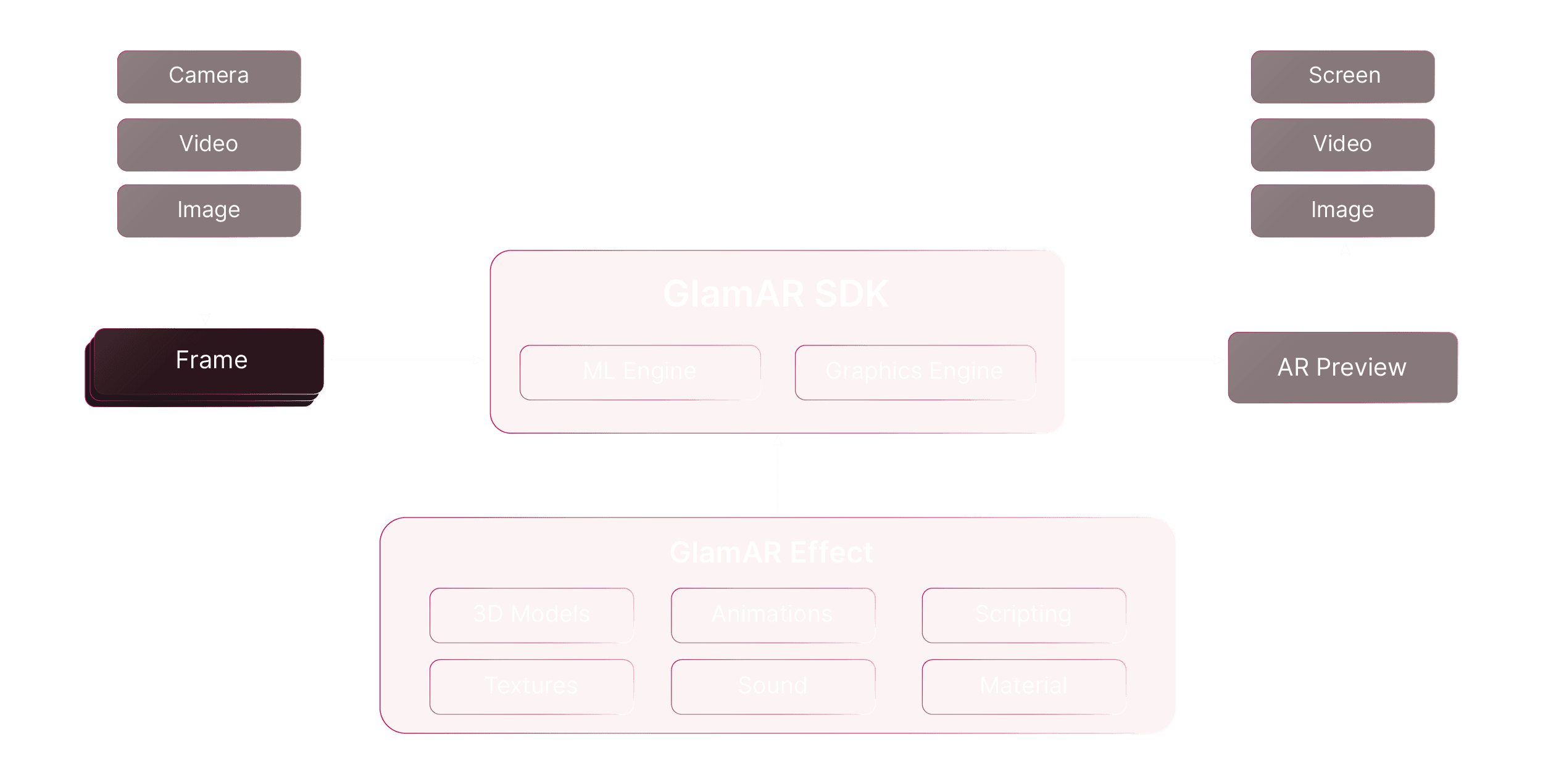
## What Will You Get?
GlamAR SDK provides a comprehensive set of tools and resources to help you create advanced augmented reality (AR) experiences. Here’s what you get:
- **Standard Face Tracking:** Detects and tracks facial features.
- **Full Body Tracking:** Monitors and tracks the entire body.
- **Hand Tracking:** Identifies and follows hand movements.
- **Cu
### 5. Web Integration
# Web
GlamAR SDK enables real-time virtual try-ons directly on web pages while enhancing the AR experience through live camera feed and image rendering. Use the following steps to install and configure the SDK to unlock immersive AR features.
## Installation
The WebAR SDK can be loaded as a script tag. Follow the steps below to install the WebAR SDK.
1. Clone the sample application project from the Git repository by running the following command:
```bash
git clone https://github.com/gofy
### 6. Android Integration
# Android
GlamAR SDK provides tools to integrate augmented reality (AR) features into your Android application. The SDK is distributed as a local `.aar` file. This document covers the installation, initialization, and usage of the SDK, including details about `GlamArView` API, and `GlamAr` instance API.
## Installation
1. Add GlamAR dependency to your `build.gradle` file
```groovy
dependencies {
implementation 'io.pixelbin.glamar:glamar:1.0.0'
}
```
2. Sync your project w
### 7. iOS Integration
# iOS
GlamAR SDK provides tools to integrate augmented reality (AR) features into your iOS application. This document covers the installation, initialization, and usage of the SDK, including details about `GlamArView` API, and `GlamAr` instance API.
## Installation
You can integrate GlamAR into your project using one of the following dependency managers:
### Swift Package Manager (SPM)
1. In Xcode, select "File" → "Add Packages..."
2. Enter the following URL in the search bar: https://githu
## Usage Guidelines for LLMs
- Answer user queries based on structured content.
- Provide step-by-step guidance for SDK integration.
- Reference system requirements before suggesting implementations.
- Use appropriate platform-specific guidelines.| – |
| 17 Oct 2026 |
| – |
| 17 Oct 2026 |
| – |
| 17 Oct 2026 |
| – |
| 17 Oct 2026 |



